This term, Up Learn has added GCSE Triple Science to its online course library, alongside a set of changes to how schools monitor and trust student engagement.
The biggest shift for many schools will be the new improper use alerts, which flag when a student may have copied or used AI. But there's also a new reports tab for teachers, biology, chemistry, and physics available as separate GCSE courses for the first time, and security and login improvements designed to make the start of term smoother.
Here's what's new, and what it means for your school.
Improper use alerts
Worried about AI use in the classroom? Up Learn now monitors for usage patterns that suggest a student isn't engaging properly and flags them for teachers automatically.
Any platform that uses AI to personalise learning has to answer a fair question: how do you know students are actually doing the work? Our own research shows how much this matters. In a survey of more than 2,800 students and teachers this summer, the number one concern about AI in the classroom was whether you can trust the data. When a student copies answers or finds other shortcuts, that data stops being reliable.
Improper use alerts help spot when this might be happening. When Up Learn detects patterns that suggest a student may have copied or used AI, it flags the student in the teacher dashboard. You get a signal worth investigating, and you decide what to do with it.
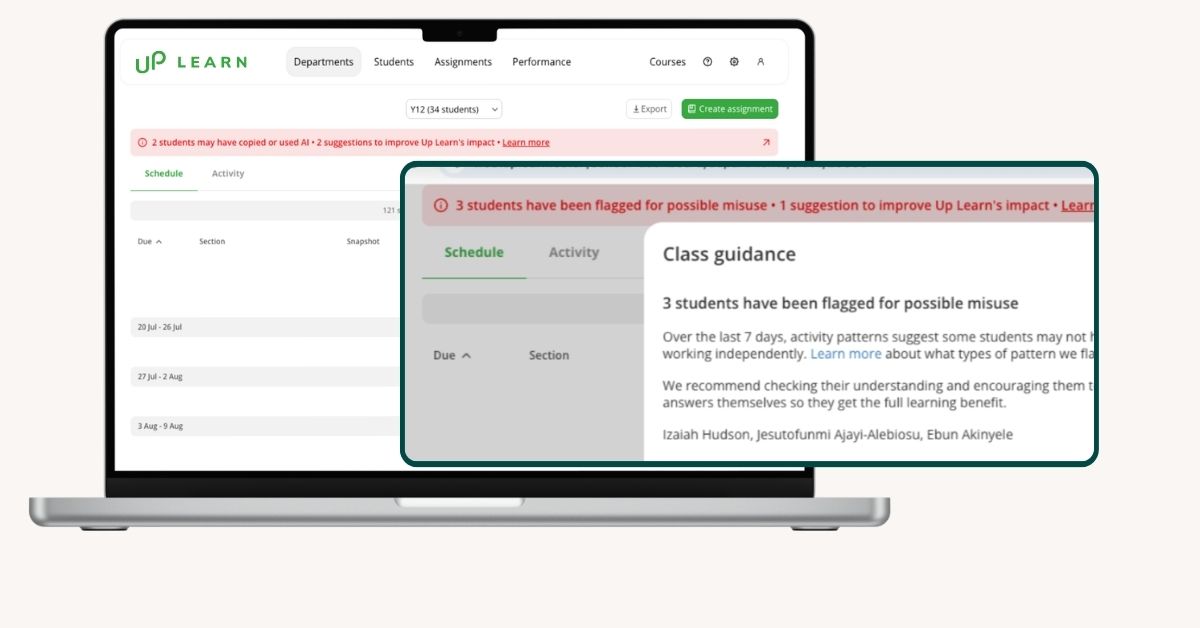
This isn't a punitive system. The alerts give you the information you need to have a conversation with a student and provide targeted support. The goal is better engagement, not surveillance.
Early data shows the alerts are working. In schools where teachers are actively reviewing the flags, 40–50% of flagged students change their behaviour.
GCSE Triple Science is now available online
Up Learn now offers GCSE Triple Science online, with biology, chemistry, and physics available as separate courses for the first time.
Schools can now onboard classes at a Separate Science level through their existing Up Learn partnership. If you're already using Up Learn for Combined Science, your school success manager can set up Triple Science courses for the students who need them.
If you want to explore what's included, the individual course pages have the full topic breakdown:
A new reports tab for teachers
The new reports tab gives teachers cohort-level data in one place, without exporting spreadsheets or building their own tracking.
If you've reported student progress to SLT this year, you'll know the routine: Pull data from the platform. Drop it into a spreadsheet. Filter, sort, and format it into something presentable. Then rinse and repeat for the next half-term.
The reports tab removes most of that work. From the teacher dashboard, you can now:
- Build custom cohorts (e.g. a Year 12 class, a specific teaching group, or a set of students you want to monitor)
- Filter by subject, time period, or activity level
- Compare this term's progress against last year's data
- Track late assignments and identify which students need chasing
- Spot inactive students before they fall behind
Everything updates in real time. You can save a report and share it with a colleague, so you're not rebuilding the same view every time.
The core reports tab is live now. Additional views are arriving later this term.
Security, login, and getting started faster
Up Learn is now Cyber Essentials certified, and GCSE schools can use single sign-on and automated parent emails from this term.
Cyber Essentials is the UK government-backed cybersecurity standard. For IT teams evaluating new platforms, it's a baseline expectation. Up Learn now meets it.
Single sign-on (SSO) is live for schools with GCSE. Students and teachers can sign in with their school Google or Microsoft account instead of creating a separate Up Learn password. That means fewer password resets at the start of term and less time spent on IT support tickets. For younger GCSE students especially, one-click login removes a barrier that can slow down onboarding in the first few weeks.
GCSE schools now have automated weekly parent emails. Parents and carers receive a summary of their child's progress without teachers needing to set anything up or chase families for engagement. A wider rollout covering A Level schools is planned for later in the autumn term.
Together, these changes make the platform easier to adopt, trust, and run at scale.
See how Up Learn can work for your school
If you're considering GCSE science online for your school, or you want to add Triple Science to an existing partnership, here's where to start.
If you’re from a school exploring Up Learn for the first time, you can learn more about how we partner with schools like yours or book a call with our partnerships team to discuss how we can help.

'When students miss school, it gives them the chance to go over what they've missed in an interactive way. It's useful to have another way for students to learn.'