Seven in ten students we surveyed this summer are actively using AI. But 74% of those students worry about the accuracy of what it tells them, and so do 73% of teachers who use it.
Those figures come from Up Learn’s survey of 2,591 students and 248 teachers, run across our UK contact base between May and August 2026. That gap between use and trust is the real challenge of AI use in schools. Students are using AI. But are they thinking while they use it?
This article shares practical frameworks from a June webinar with Beverly Clarke MBE, a former computer science teacher and AI in education expert. Her core argument: AI should be a thinking partner, not an answer machine. We cover when to question AI outputs, how to build critical thinking into AI tasks, and how Up Learn applies these principles in its own platform.
AI demands more thinking, not less
When students use AI without being taught how to question it, the technology hides gaps in understanding rather than closing them.
Schools are getting clear signals that AI needs structured attention. The DfE updated its AI guidance in May 2026. KCSIE 2026 brings AI into the statutory safeguarding framework for the first time. And the government’s Curriculum and Assessment Review has flagged digital literacy and AI as priorities for the revised computing programmes of study.
Policy is moving. But policy alone doesn’t change what happens in a classroom.
Beverly Clarke MBE is a former computer science teacher and a member of the UK government’s Digital, AI and Technology Task and Finish Group. She was also named one of the most influential women in UK tech by Computer Weekly in 2025. In a June Up Learn webinar, she set out a practical case for how AI in the classroom can strengthen thinking rather than replace it.
Two ways students use AI
Clarke’s starting point is a distinction most teachers will recognise. When students treat AI as an answer machine, they copy the output, skip the checking, and submit without question. The result looks like completed work. But it hides shallow understanding.
The alternative is to use AI as a thinking partner. That means questioning the output, testing assumptions, and revising ideas based on what the AI returns. Learning happens in that process of checking, challenging, and improving, rather than in the initial answer.
How AI can build student confidence
Clarke also highlights how AI can support confidence when used well. AI gives students a low-pressure space to rehearse their thinking.
You’ve likely seen this in your classroom: the student who won’t raise their hand but will quietly check their reasoning with an AI tool first. They might ask for a concept to be explained again or request a different example. They might also check they’re on the right track before bringing their ideas to a group discussion.
Our survey points the same way. Among student AI users, 80% use it to explain difficult concepts. Only 40% use it for help with essays, the task most associated with cheating.
This matters because critical thinking requires confidence. Students need to feel able to ask questions, admit uncertainty, test ideas, and change their mind. AI can help with that. But confidence built on being handed an answer isn’t the same as confidence built on understanding. The goal should always be the latter.
Why this matters now
Generative AI gives near-instant answers to almost any question. That makes the ability to evaluate those answers more valuable than ever. When information is easy to produce, critical thinking is what separates a student who understands a topic from one who can paste a convincing paragraph about it.
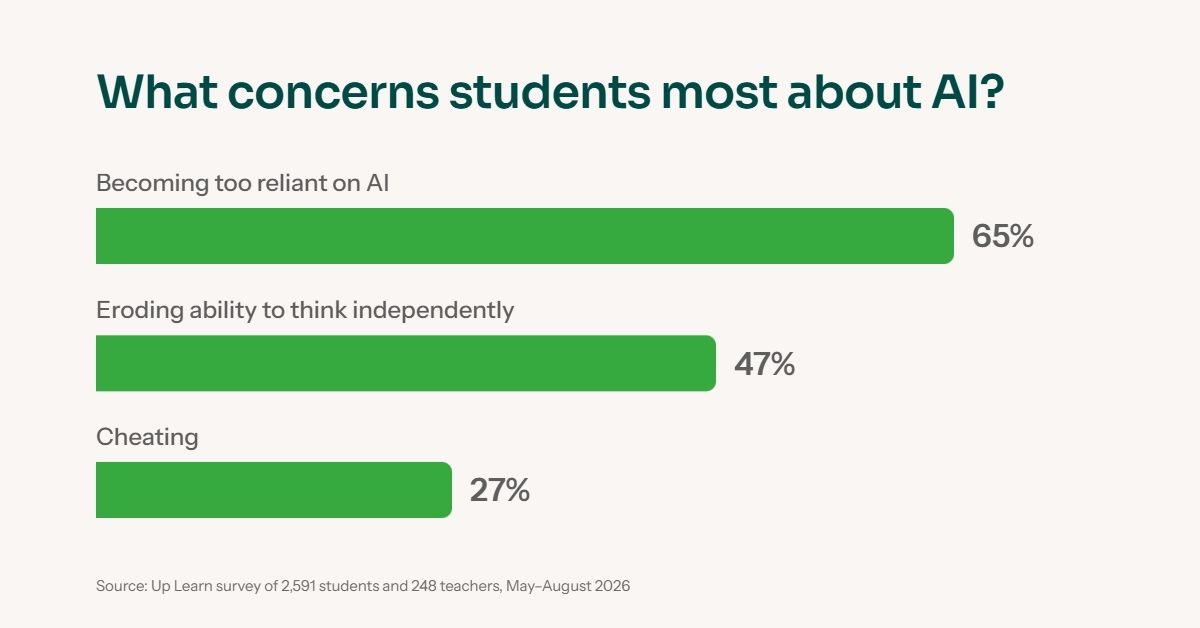
Students recognise this themselves. In our survey, 65% of students worried about becoming too reliant on AI. Nearly half (47%) worried it’s eroding their ability to think independently. By contrast, only 27% named cheating as a top concern. Those worries point towards better teaching, not an outright ban of AI use in schools.
Clarke’s argument is that educators need to lead how AI is taught and used in the classroom. Students won’t automatically know how to interact with AI in ways that deepen their understanding. That has to be taught, modelled, and built into how lessons and assignments are designed.
How and when to question AI outputs
AI outputs can be wrong, incomplete, or biased, and students need to be taught specifically when and how to challenge them.
Students and teachers already sense this. In our survey, accuracy was the top AI concern for both groups, well ahead of cheating. That instinct is healthy. What students need next is a routine for acting on it.
The DfE’s own guidance is clear that AI tools must be used with human oversight because they can produce false information, reproduce bias, or mishandle data. The practical question at the heart of any AI guidance for schools is: how do you help students recognise when to slow down?
Four moments to pause
Clarke identifies four situations where learners should stop and check before accepting an AI response:
- When AI makes a factual claim
- When the topic is high-stakes, complex, or contested
- When no sources, evidence, or reasoning are provided
- When the output sounds confident but feels too generic
Each of these is a signal to check the response before trusting it. Students who can spot these patterns are already thinking more carefully than students who accept whatever appears on screen.
Five questions to ask before trusting an AI response
Clarke takes this further with five questions learners can apply to any AI output:
- Accuracy: Is this correct? How should I check?
- Evidence: What source or evidence supports this?
- Assumptions: What is being assumed?
- Bias: Whose perspective is missing?
- Usefulness: Does this help me understand the topic? Why?
The value is in deliberately questioning output as a routine part of working with AI tools. Clarke suggests these work as a classroom poster, a slide at the start of an AI-based task, a worksheet checklist, or an assignment prompt. The format matters less than the habit. When students ask these questions every time they use AI, they stop treating AI outputs as answers and start treating them as starting points.
If you want a shorter version for students revising at home, our three questions worth asking before you trust an AI answer cover similar ground.
From answer machine to thinking partner: a practical framework
Clarke’s Critical Thinking AI Lifecycle is a five-step classroom framework that moves students from passively accepting AI outputs to actively questioning, verifying, and learning from them.
It draws on established principles of metacognition and responsible AI use, but its strength is simplicity. There are five steps, and they work across subjects and year groups.
The Critical Thinking AI Lifecycle
- Start with your own thinking. Before opening any AI tool, write down your view on the question or topic. Include your reasons. This gives the student something to measure the AI’s response against.
- Ask AI to challenge that thinking. Use the AI as a sounding board, not a search engine. A prompt like ‘challenge my argument about [topic], what assumptions have I made, and what evidence would I need?’ pushes the AI to respond in a way that tests the student’s reasoning.
- Check the AI response against evidence. Which points are claims? Which are supported by sources? Is anything biased, incomplete, or over-generalised? Students should verify key claims using trusted sources rather than accepting the AI’s confidence at face value.
- Revise your thinking. Based on what the AI returned and what the evidence shows, update your original position. What’s changed? What still needs checking?
- Explain what changed and why. This is where learning becomes visible. Students articulate how their thinking developed through the process, which gives teachers something meaningful to assess.

Here’s what this looks like in practice. A Year 12 biology student is asked whether antibiotic resistance is primarily a medical problem or a behavioural one. Before opening an AI tool, they write their initial view: it’s medical, because bacteria mutate.
They then prompt the AI: ‘Challenge my argument about antibiotic resistance and tell me what evidence I’d need to support it.’ The AI raises agricultural antibiotic use, patient non-compliance, and global sanitation. The student checks these claims against published sources, discovers that the WHO attributes a significant share of resistance to livestock use, and revises their position.
Their final answer is more nuanced, and they can explain exactly what changed and why. That process is the point.
Prompts that model the right habits
The framework works best when teachers pair it with prompts that encourage reflection rather than shortcuts. Clarke recommends prompts like these:
- ‘Ask me three questions that will help me think more deeply about [topic].’
- ‘What assumptions might I be making about this topic?’
- ‘What evidence would strengthen my answer?’
- ‘Do not rewrite my answer.’
- ‘What might I have misunderstood?’
- ‘Help me reflect on what I know and what I still need to check.’
The prompt ‘do not rewrite my answer’ signals to the AI that the student wants to keep their own voice and reasoning intact. Without it, students often end up submitting AI-polished text that sounds impressive but no longer reflects their own understanding.
Teach the prompting, don’t assume it
Clarke is direct on this point: educators need to model these prompts explicitly. Students won’t arrive at this way of working with AI on their own. Expecting students to prompt AI well without showing them how is like expecting them to evaluate sources without teaching research skills.
Clarke mentions several established prompting frameworks that can help standardise AI use in schools across departments and year groups. These include TCREI (Task, Context, Relevance, Evaluate, Iterate), RISEN (Role, Instructions, Steps, End goal, Narrowing), and one called GCSE (Goal, Context, Setting, Evaluation).
Understanding these frameworks and experimenting with effective AI prompts for teachers helps educators spot common prompting pitfalls and correct them in their students.
Why human expertise stays central to AI use in schools
UNESCO and the OECD both maintain that educators, not AI, must design the learning experience and make professional judgements about what good understanding looks like.
UNESCO’s position is that educators, not AI, determine the future of education. They respond to context, emotion, and misconceptions in ways AI cannot.
The OECD’s Digital Education Outlook 2026 reinforces this, calling for approaches that place human judgement and oversight at the centre of AI use. It warns that generative AI should enrich learning, not replace cognitive effort or reduce teacher professional judgement.
Embedding responsible AI use in practice
Clarke argues that responsible AI use in schools can’t just be tucked away in a policy document. It has to be embedded in learning routines where educators:
- Are transparent about when, where, and why AI is being used
- Set clear expectations for students about what AI-supported work looks like
- Design tasks where learners must show their thinking process, not just their final output
Teachers already do this with other resources. A student who submits a history essay is expected to show their sources. A student who uses a calculator in maths is expected to show their working. AI should be treated the same way. The tool is permitted, but the thinking must be visible.
How Up Learn uses AI responsibly
Up Learn’s platform is built on human-authored content and expert tutors, with AI playing a supporting role in tutoring, marking, and diagnostic routing.
Built by people
Up Learn’s courses are written, animated, and refined by a team of content developers and learning executives. Every lesson is scripted, designed, and mapped to the course specification by a human. When students need to speak to someone, human tutors are available around the clock.
This matters because content quality and curriculum alignment are the foundation of any good use of AI in schools. AI is useful, but only when it’s layered on a knowledge base that’s already accurate, well-structured, and built with learning science in mind.
Teachers and students both notice when that foundation is missing. In our survey, 41% of student AI users worried AI isn’t aligned with their exams. Among teachers, the figure rose to 48%.
Where AI supports the learning
AI plays a supporting role in three specific areas:
UpBot AI tutor
UpBot is a live AI chat tool, available 24/7 within the learning platform. It’s trained on Up Learn’s own courses and curriculum summaries rather than the open internet. When a student asks a question at 11pm the day before an exam, UpBot draws from the same material they’ve been studying. It guides students towards understanding rather than giving them a finished answer.
In the past year, UpBot has resolved more than 17,000 student conversations with a satisfaction rate above 90%.
AI-assisted marking
AI acts as a second marker in students’ exam practice questions on the platform. If Up Learn’s primary system flags an answer as incorrect, AI reviews it before the student sees the result. This has reduced remark requests by 90%. The model is trained through distillation against expert human marks. That means it improves over time while staying grounded in what educators consider correct.
Diagnostic quizzing and smart routing
Diagnostic quizzes identify what a student already understands and where they still need support. The system adapts the learning pathway based on demonstrated knowledge, so students spend their time on what will make the most difference.
Read How Up Learn blends AI and human expertise in education to learn more.
Keeping student thinking visible
Clarke’s point about visible thinking applies to learning platforms too. Up Learn’s improper use alerts flag students whose activity suggests they may have copied or used AI. The flag appears in the teacher dashboard, and you decide what to do with it.
The alerts are designed to prompt a conversation and targeted support rather than punishment. Early data shows that in schools where teachers actively review the flags, 40–50% of flagged students change their behaviour.
What the evidence shows
Up Learn’s Evaluation of learning outcomes 2025 analysed data from 23 schools and nearly 2,500 exam entries. The findings are consistent across subjects, schools, and cohorts:
- Completing 90% or more of assignments set correlates with an average increase of approximately one full grade.
- Achieving mastery (80%+ correct) in at least 20% of sections correlates with nine additional months of progress.
The pattern matches what Clarke advocates for AI use in schools. Up Learn uses targeted AI to improve personalisation, feedback, and the learning experience, alongside expert-authored content and human judgement.

Where to start
Making AI use meaningful in your school starts with how you set the next AI-based task.
The schools that get the most from AI will treat it as something to teach with, not just something to manage.
The frameworks Clarke outlines offer a practical starting point. Question AI outputs as a routine part of any task. Use the Critical Thinking AI Lifecycle to make student thinking visible. Model good prompting explicitly rather than assuming students will work it out. Start with one class, one task, one prompt. And keep human expertise at the centre of every decision about how AI is used.
None of this requires a full policy overhaul or a new technology budget. Meaningful AI use in schools starts with how the next AI-based task is set, and what students are expected to show when they hand it in.
If you want a ready-made starting point, we’ve put together prompts designed for KS4 and KS5 teachers to use in exactly this way.
Download our free guide: 33 AI prompts that actually help you teach.

'When students miss school, it gives them the chance to go over what they've missed in an interactive way. It's useful to have another way for students to learn.'